Launching a token on Pump.fun takes about five minutes and costs almost nothing: no code and no liquidity to seed, only a name, a ticker, an image, and as much SOL as you choose to spend on your own first buy. Everything around those five minutes is the hard part: how big that first buy should be, who buys in the seconds after it, what the fees add up to, and what happens when the coin graduates. This guide covers both ways to launch, and how to get the hard part right.
How Pump.fun works in 60 seconds
Every Pump.fun coin starts on a bonding curve: a contract that sells the token along a fixed price formula instead of an order book or a liquidity pool. The SOL curve starts with 30 virtual SOL against 1.073 billion virtual tokens. Nobody deposited them; they exist only to set the opening price, about a 28 SOL market cap (≈$3.3k at $119 SOL). Every buy pushes the price up the curve, and every sell pushes it back down the same path.
The curve sells 793.1M of the 1B total supply (79.31%). When net buys reach about 85 SOL, the curve is complete and the coin graduates: Pump.fun moves the raised SOL and the remaining 206.9M tokens into a PumpSwap pool, and trading continues there. That puts the market cap at graduation at about 411 SOL (≈$49k at $119 SOL).
Two ways to launch on Pump.fun
- On the pump.fun website. Free, one wallet, about five minutes. You get the coin and your own first buy; everything after that, you do by hand.
- With Sumo. Sumo is a launch and trading platform for token teams. It creates the same Pump.fun coin, but your whole team's wallets buy in the same block the coin is created, ahead of the bots, and automated trading strategies then sell into demand for you, so you take profit without dumping the chart.
Both routes are covered step by step below. If you'd rather see it first, watch a full live launch on Sumo (7:45).
Before you launch: what to prepare
Pump.fun locks every piece of coin data at creation: name, ticker, description, social links, image and banner. Prepare all of it before you open the form.
- Name and ticker. Search pump.fun for the ticker first. Duplicates are allowed, which means a copycat already trading under your ticker will split your search traffic.
- Image or video. Images up to 15 MB, at least 1000×1000 px, square recommended (JPG, GIF or PNG). Videos up to 30 MB, 16:9 or 9:16 at 1080p or better. An optional banner shows on the coin page.
- Socials. Website, X and Telegram. Create the accounts before the coin, because the links cannot be added afterwards. A coin that launches with no socials rarely gets a second look.
- A funded Solana wallet holding your dev buy, plus a little SOL for fees. You'll need to sign in to pump.fun before the create button unlocks.
- A dev buy size, decided in advance. Your first buy is the cheapest on the curve, so a little SOL goes a long way: about 3.5% of supply for 1 SOL, 15% for 5 SOL and 27% for 10 SOL. The top holders are listed on the coin page, and traders check them before buying, so size it deliberately rather than in the moment.
Step by step: launching on the pump.fun website
1. Fill in the coin details
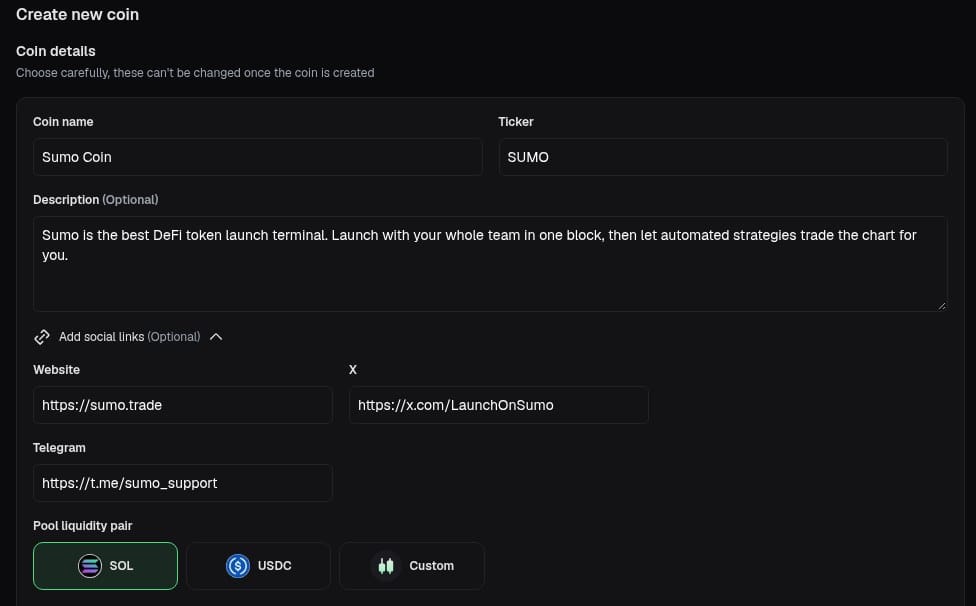
Go to pump.fun/create, sign in, and enter the coin name, ticker and description. Expand Add social links for website, X and Telegram. None of it can be changed once the coin exists.
2. Pick the pair: SOL, USDC or Custom
The pair is what the coin is priced in. SOL is the default and where nearly all Pump.fun volume trades. USDC runs the same curve in dollars (about 12,160 USDC of buys to graduate), so your market cap stops moving with SOL's price. Custom prices the coin in another token Pump.fun accepts, mostly tokenized stocks such as AAPLx and wrapped majors, and is the one pair where you can set your own creator fee.
3. Choose who gets creator fees, and skip Mayhem mode
Every trade pays a creator fee. Creator sends it to your wallet to claim whenever you like; Holders has Pump.fun pay it out to the coin's holders instead, permanently.
Mayhem mode lets Pump.fun's AI trading agent trade your coin for its first 24 hours, using a second billion tokens it mints for the purpose. It adds activity but also supply, and Pump.fun's docs warn that holders may be unable to sell into the curve if the agent ends up a net seller. Leave it off unless you've read that page.
4. Upload the image, create the coin and make your first buy
Upload the image or video (plus an optional banner) and click Create coin. Pump.fun offers an optional first buy; this is your dev buy, and it lands in the same transaction as the coin's creation. Approve it in your wallet and the coin is live in the "new" feed a few seconds later.
What it costs: Pump.fun fees in 2026
Figures below were read from Pump.fun's on-chain fee configuration on 29 September 2026. Pump changes them from time to time, so check before you rely on them.
| What | Cost | Who gets it |
|---|---|---|
| Creating the coin | No platform fee, only Solana rent and network fees (a few hundredths of a SOL) | Solana validators / account rent |
| Every buy and sell on the curve, including your dev buy | 1.25% of the SOL traded | 0.95% Pump.fun, 0.30% creator (or holders) |
| Trades on PumpSwap (SOL pairs), market cap under ~420 SOL | 1.25% | 0.93% protocol, 0.30% creator, 0.02% LPs |
| Trades on PumpSwap (SOL pairs), market cap above ~420 SOL | 1.20% at first, falling to 0.30% as the market cap grows | Creator share starts at 0.95% and steps down to 0.05% by ~98k SOL; 0.20% LPs; 0.05% protocol |
The creator fee is the part that matters most after launch. On a coin that trades actively, it is a real income stream, and it keeps paying after graduation. For the full launch-day budget across venues (dev buy, extra wallets, fees), run the launch cost simulator.
What happens in the first 60 seconds
This is where most first launches go wrong. Bots watch Pump.fun's program for new coins and buy within the first block or two, before any human has seen the coin. Your dev buy is safe because it's in the creation transaction. Anything after it is a race:
- Snipers buy right behind you at almost your price, then sell into the first real buyers. On the chart it looks like an instant pump and dump, which scares off everyone else.
- Your team can't buy together. If co-founders or early backers want an allocation, each of them buys in a separate transaction after the snipers, at a higher price.
- A single large dev wallet is a target. Traders watch it; if it sells even a little, the chart reacts.
- No one is managing the market. The launch form ends at the create button. Nothing on pump.fun handles the next hour, which is when most coins die.
None of this is a flaw in Pump.fun. It's a launchpad, and it does that job well. Running a launch is a different job, and that's the one Sumo was built for.
Why launch your Pump.fun token on Sumo
Sumo is a platform for teams launching and running a token. It creates your coin on Pump.fun exactly as the pump.fun website would: same program, same bonding curve, same graduation. The difference is what it handles around the launch: who buys in the first block, which wallets they buy from, and what happens to the market once the coin is live. You set the launch up once in a guided form, Sumo executes it, and the same dashboard keeps working on the coin afterwards.
- Your whole team buys before the bots. On pump.fun only the creator's first buy lands alongside the coin's creation; everyone else has to race the bots. Sumo sends the coin's creation, your dev buy and buys from up to 15 more wallets as a single bundle: a group of transactions that Solana block builders (through the Jito network) accept all together in one block, or not at all. Nobody can buy in between, so your team's buys are the first on the curve, where it's cheapest, and no sniper gets ahead of them.
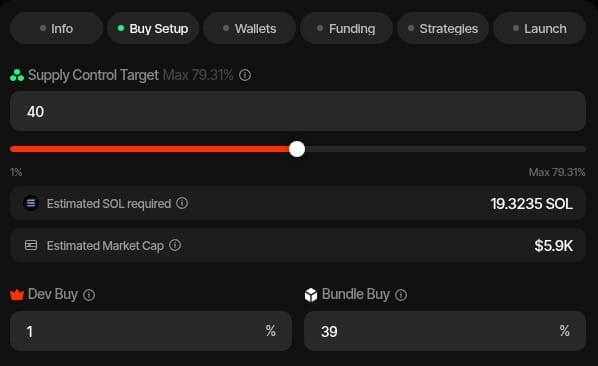
- You see the numbers before you commit. Instead of guessing a SOL amount, you choose how much of the supply your team should hold, say 20%. Sumo works out how much SOL each wallet needs and what market cap the chart will open at, before anything is sent.
- Automated trading from minute one. Sumo runs trading bots, called strategies, that buy and sell your coin from your wallets according to rules you set. You configure them during the launch setup and switch them on as soon as the coin is live, so the market is actively managed in the first hour, the hour when most new coins die. For example, a Counter Trade strategy watches for other people's buys and sells a small slice of your team's supply into each one, selling in small pieces against real demand instead of in one large sell with heavy price impact. A DCA strategy sells small amounts on a schedule instead of all at once.
- No developer, no scripts, and your keys stay yours. Launching with multiple wallets usually means hiring a "launch dev" or running scripts, and handing someone your private keys. In Sumo you create or import wallets with a few clicks; the keys are encrypted in your own account and you can export them at any time.
- Every pump.fun option. Launch in SOL, USDC or a custom quote token, send creator fees to yourself or to holders, and set your own creator fee percentage on custom-quote coins.
- One dashboard after launch. A live feed of every trade on your coin, buying and selling from many wallets at once, your running strategies, Telegram alerts, and one-click creator fee claims. It keeps working when the coin graduates to PumpSwap.
- One platform for every launchpad. The same setup launches coins on BONK.fun, Four.meme, Flap, Pons, Uniswap and more, across Solana, BNB Chain, Ethereum, Base and Robinhood Chain.
Pricing is simple: each launch is either a $250 launch ticket or 0.5% of token supply, your choice, and trades Sumo executes carry a 1% platform fee.
How to launch on Pump.fun with Sumo
A Sumo launch is a six-step form. You fill it in, fund the wallets, and press launch; Sumo creates the Pump.fun coin and places every buy in the same block. Here is the whole thing on a real launch, from an empty form to live trading:
Sumo vs launching directly on pump.fun
| pump.fun website | Pump.fun through Sumo | |
|---|---|---|
| Who buys in the launch block | Only the creator's first buy; the rest of the team races snipers | The creator plus up to 15 team wallets (12 on USDC and custom quotes), all in one bundle, before any sniper |
| How you size the launch | Type a SOL amount | Pick a share of supply; Sumo calculates the SOL per wallet and the opening market cap |
| Quote token | SOL, USDC or custom | SOL, USDC or custom, plus your own creator fee on custom quotes |
| Wallets | The one wallet you sign with | As many as you need, created or imported, keys encrypted in your account |
| Selling after launch | Manual sells from each wallet | Automated strategies sell into demand across all your wallets |
| After launch | The coin page | Trading dashboard, Telegram alerts, creator fee claims |
Step 1: Coin details
Pick the launch type: Pumpfun SOL, Pumpfun USDC or Pumpfun Custom, matching pump.fun's three pairs. Then enter the same details the pump.fun form asks for: name, ticker, image, description, and X, Telegram and website links. You also give the launch a name inside Sumo; this becomes the coin's workspace (Sumo calls it a profile), where its wallets, trades and strategies live.
When you save, Sumo reserves the coin's token address in advance, so you know the contract address before launch without generating one yourself.
Step 2: Decide how much supply your team buys
Here you design the launch. Set the Supply Control Target: the percentage of the total supply your wallets should hold right after launch, up to the 79.31% the curve can sell. Split it between the Dev Buy (the creator's wallet) and the Bundle Buy (shared across the extra team wallets), and choose how many team wallets to use. As you change the numbers, Sumo shows the total SOL required and the market cap the chart will open at.
This step is also where you decide where creator fees go:
- To you (the default): fees build up in the creator wallet, and you claim them from Sumo whenever you like.
- To holders: Pump.fun pays the fee out to the coin's holders. This is permanent.
- On a Pumpfun Custom launch you also choose the quote token (tokenized stocks like AAPLx, wrapped majors and other tokens Pump.fun accepts) and can set your own creator fee percentage.
Step 3: Set up the wallets
Choose the dev wallet, which creates the coin and makes the first buy, and the team wallets that buy alongside it. You can import wallets you already have using their private keys, reuse wallets from another Sumo launch, or have Sumo generate fresh ones. The keys are encrypted and stored in your own Sumo account, and you can export them whenever you want to use them elsewhere.
Step 4: Fund the wallets
Sumo lists every wallet with the amount it will buy and the SOL it needs, including fees. Send the SOL (and USDC for a USDC launch) and click Check Balances. Each wallet is marked ready once it has enough. For a custom-quote launch, you fund the wallets with SOL and Sumo swaps it into the quote token from the same screen. The launch won't go out until every wallet is ready, so it can never fire with half the team missing.
Step 5: Set up automated trading
This is the part pump.fun doesn't have. Strategies are bots that trade your coin from your wallets, following rules you set. You create them now, before the coin exists, and switch them on once it's live:
- Counter Trade watches for other people's buys and automatically sells into each one, for example 30–40% of the size of every buy over $50. Each sale is small next to the buy it follows, so its price impact is far lower than one large sell. The sells are public on-chain like any other trade.
- Limit orders sell automatically once the coin reaches a market cap you choose, for example selling 0.5 SOL at a time while the market cap is above $250k, up to a total budget you set.
- DCA sells in small pieces on a schedule, for example 0.25 SOL worth every 10 minutes for a day, so the team takes profit gradually instead of dumping on holders.
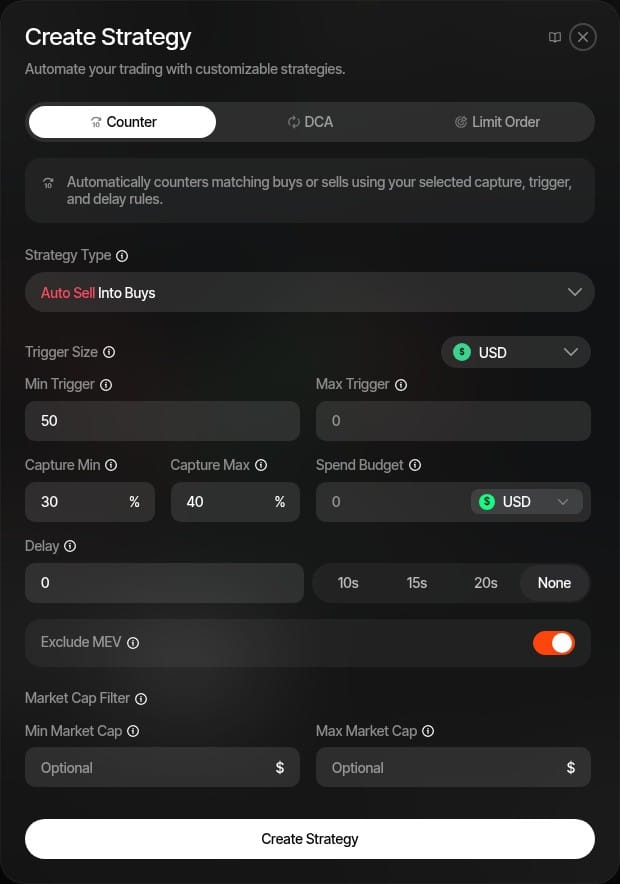
Strategies can also buy, for example a set share of incoming sells within a budget you fix, and settings you like can be saved as presets for your next launch.
Step 6: Review and launch
A final summary shows everything on one screen: the coin's details and address, the wallets, how the supply is split, the funding status and the strategies you've prepared. Click Launch. Sumo sends the coin's creation, the dev buy and every team buy as one bundle, which lands in a single block. There is no gap for a sniper: your team's buys are the first on the curve, and the first outside buyer comes in after all of them.
Because the team's share is bought openly at launch, it's easy to present as exactly what it is: the team's stake in its own coin.
Once the coin is live
The launch turns into the coin's trading workspace. The Live Trading view shows your coin's chart, volume and every trade in real time. From there you switch on your strategies, buy or sell from any of your wallets, and get Telegram notifications about what's happening.
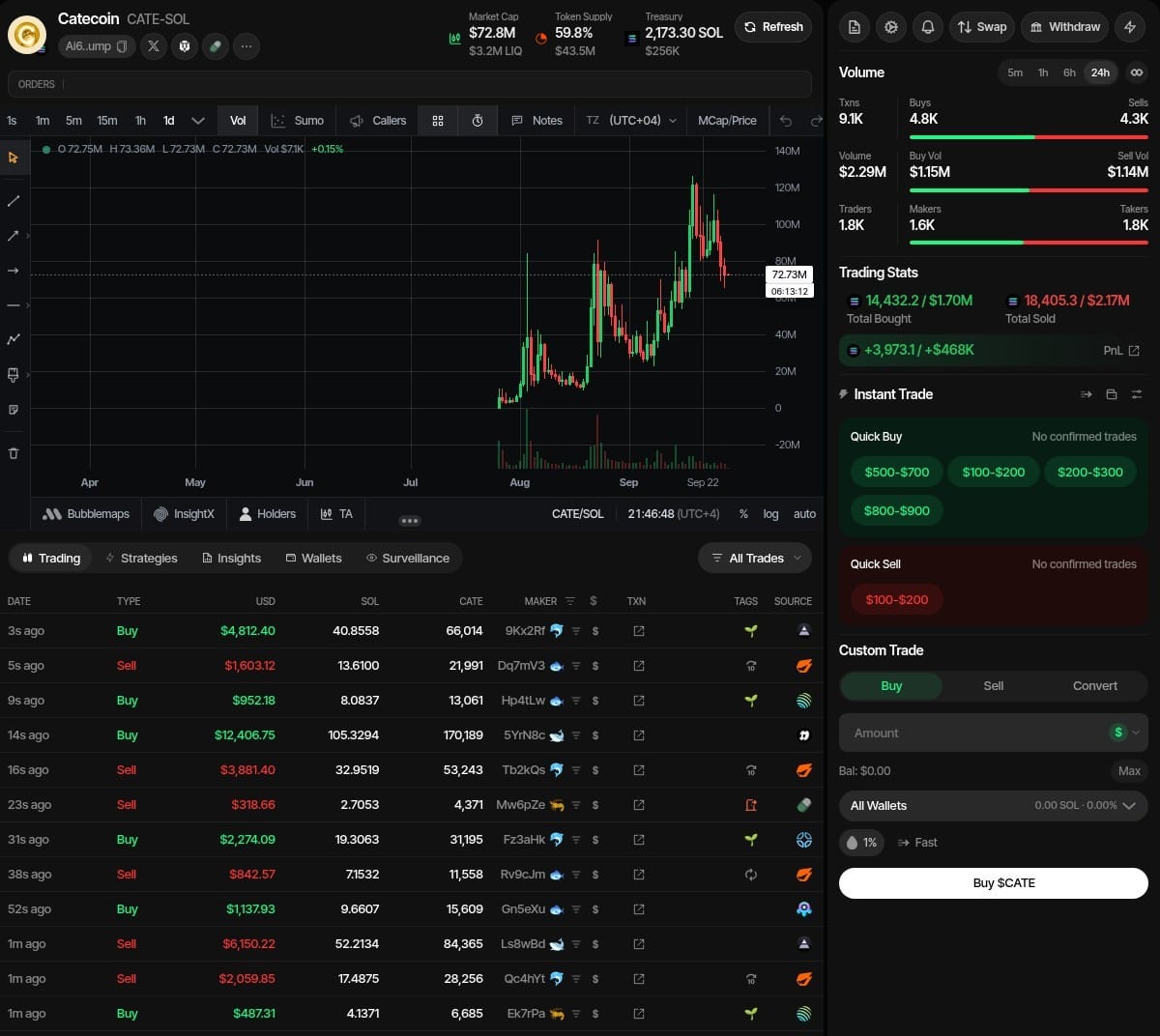
Creator fees. If the fees go to you, they build up until claimed. In Sumo that's the Claim creator fees button, before and after graduation (on the pump.fun website, it's on the coin page). You can also share creator fees with up to 10 other wallets, but Pump.fun locks the split once it's set, so check every address.
Graduation. When the curve completes, Sumo follows the coin to PumpSwap and your strategies keep running there. That matters, because graduation is the beginning of the market, not the end: on PumpSwap the coin trades against a real pool and everything on Solana, from arbitrage bots to MEV, and most of a coin's lifetime volume happens there. How well you make the market and sell into it is what decides whether the chart holds. You can practise in the market making simulator.
Every field in the setup is explained in the Pump.fun launch docs, and pricing is on the platform fees page.
Common mistakes on a first Pump.fun launch
- An oversized dev buy from one wallet. 20 SOL buys ~43% of supply, and the holder list shows it to every trader.
- Launching without socials. Links can't be added after creation. No X account at launch means no way to verify the coin is yours.
- A low-resolution image. Below 1000×1000 px it looks blurry in the feed, where most first impressions happen.
- Turning on Mayhem mode without reading the docs. It doubles supply for 24 hours.
- Market-selling the team's supply. One big sell into a thin pool has a large price impact: a worse fill for you and a sharp drop for every holder. Sell into demand instead, in small pieces, which is exactly what Sumo's strategies automate, and tell your holders that the team sells on a plan.
FAQ
How much does it cost to launch a token on Pump.fun? Creating the coin has no platform fee, only a few hundredths of a SOL in Solana rent and network fees. Everything else is optional: your dev buy (any amount, plus the 1.25% trading fee) and any buys from other wallets.
Do I need to know how to code to launch on Pump.fun? No. The pump.fun create form handles the token, metadata and bonding curve, and Sumo runs a launch with your whole team's wallets from a guided six-step form. You need a name, ticker, image, socials and funded wallets.
Why launch on Sumo instead of directly on pump.fun? Sumo creates the same Pump.fun coin but handles the whole launch around it. The coin creation, your first buy and buys from up to 15 team wallets land together in one block, so snipers cannot buy in between and your team's buys are the first on the curve. Sumo works out how much SOL each wallet needs from the share of supply you want, runs automated trading strategies on the coin from the moment it is live, and gives you one dashboard for trading, alerts and creator fee claims, before and after graduation.
How much does it cost to launch on Pump.fun with Sumo? Each launch is either a $250 launch ticket or 0.5% of token supply, your choice, and trades Sumo executes carry a 1% platform fee. Pump.fun's own fees are the same either way.
At what market cap does a Pump.fun coin graduate? A SOL-quoted coin graduates after about 85 SOL of net buys, which puts its market cap at roughly 411 SOL. The USD figure moves with the SOL price; it is about $49k at $119 SOL.
Can I change my token name, image or socials after launch? No. Pump.fun locks the name, ticker, description, image, banner and social links when the coin is created. Prepare everything before you open the form.
How do Pump.fun creator fees work? Every trade pays a creator fee: 0.30% on the bonding curve, and a market-cap-tiered share on PumpSwap after graduation. It goes to the creator wallet (or to holders, if chosen at creation) and is claimed from the coin page, or with one click in Sumo.
Can snipers buy before my dev buy? No. Your dev buy is in the same transaction that creates the coin. Snipers buy immediately after it, so on pump.fun any other team wallet competes with them. Launching through Sumo puts the team wallets' buys in the same block as the coin's creation, so they buy before any sniper can.
What is Mayhem mode on Pump.fun? An optional setting, chosen only at creation, that lets Pump.fun's AI trading agent trade the coin for 24 hours using an extra 1B minted tokens. Unsold tokens are burned after 24 hours. It adds activity and supply risk; read Pump.fun's documentation before enabling it.
New to the jargon? The memecoin dictionary translates it. Deciding between Pump.fun and other launchpads? How to launch a memecoin in 2026 compares the options, and the bonding curve explainer puts every launchpad's curve on one chart.
Related Sumo docs
- Pump.fun launch: every step of the launch setup for SOL, USDC and custom quote launches.
- Creator fee claims and Holder Rewards.
- Counter Trade, DCA and limit orders for after launch.